Write down what you spent, without writing it down.

Type or say a sentence. TLDR Money turns it into transactions.

No bank login. No email access. No ads, ever — not even on the free plan.

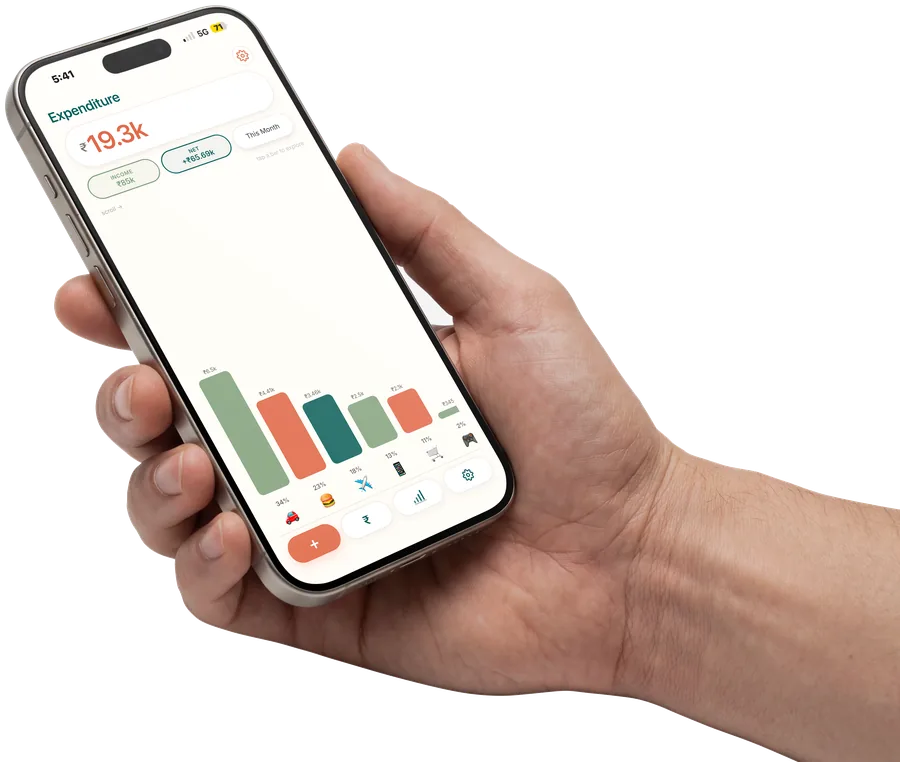
The app open on an iPhone held in one hand, showing a month's spending total above a bar chart of spending by category.

Heard

forty on groceries yesterday

  • Groceries Groceries · Yesterday $40
Save

Amount, merchant and category are all editable before it saves.

How it gets in

Two ways in, and neither is a form.

Typing an amount into four boxes is why people give up on manual tracking in the second week. So you write a sentence instead, or you say one, and the app does the boxes.

A sentence can hold several things at once. Four purchases in one message is one entry, not four.

  • Type it. A sentence becomes one transaction or five, each categorised and dated.
  • Say it. Speak the entry and a confirm card opens with everything editable.
  • Or just type the numbers. Plain manual entry is unlimited and free, on every plan, forever.

Coming shortly

On iPhone, an Apple Pay purchase will land in your ledger already categorised. Apple Pay purchases only, not card swipes.

How much did I spend on dining last month?

$412

You spent $412 on dining in August, 18% more than July.

Ask can tell you what you’ve spent. It doesn’t give financial advice.

Ask

Ask what you spent. See the working.

Most apps that answer questions about your money hand your transactions to a model and hope it adds them up correctly. A model asked to total two hundred rows will get it wrong, confidently.

This one turns your question into a query. The app runs the query against your own ledger and computes the number itself. Your question leaves the device. Your transactions never do.

  • Every answer shows the filter it ran, and taps through to the transactions behind it.
  • An empty result is an answer, not an error.
  • It reports what happened. It never says what to do.

August 2026

$3,240

Total spent

Income
$5,100
Saved
36%
  • 🍽 Dining $812 25%
  • 🛒 Groceries $640 20%
  • 🚗 Transport $389 12%

Where it went

One tap, and your month is a card.

Total spent, income, savings rate, and where the money actually went, ranked. One tap from the stats screen and it is an image in your share sheet.

It is free on every plan, including the free one.

  • The month you are in on Free. Any date range on Pro.
  • No watermark over your numbers, and nothing obscured.

Our ledger · September

$1,284
  • Weekly shop Groceries · added by Ana $128
  • Electricity Utilities · added by Mateo $94
  • Rent Rent · added by Ana $950

Two people, one ledger

Share it with one person. One subscription covers both.

A separate shared space, not a merge of two personal ledgers. You both add, you both edit, and every entry shows who put it there.

The person you invite does not need to pay.

  • Invite by email link. Two accounts, and you can revoke access at any time.
  • No splitting, no settle-up, no working out who owes whom. It is a shared record, not a referee.

The app itself

What it looks like on your phone.

Three screens from the app itself, not a redraw. There is no dashboard to assemble first and no template to fill in.

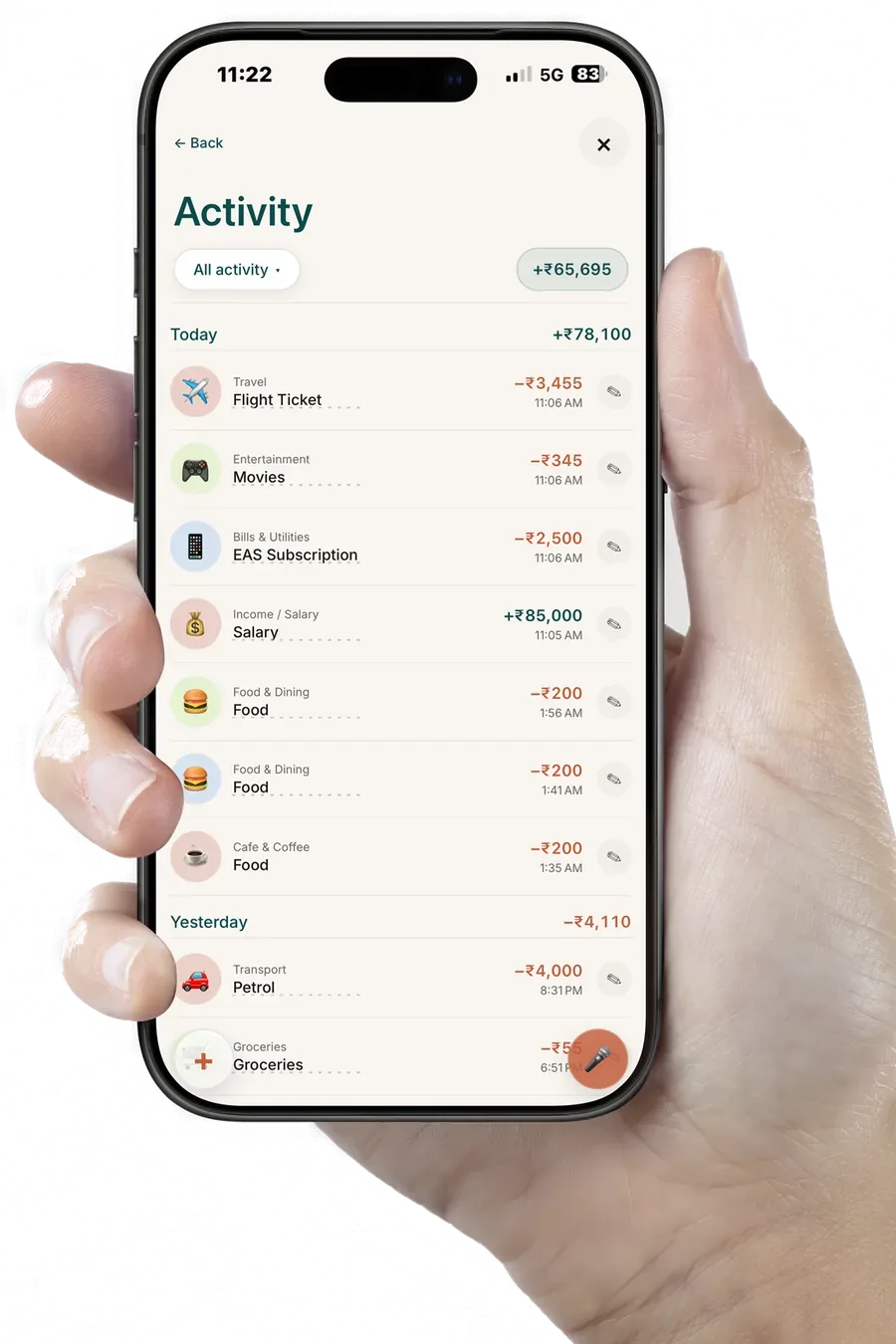
The Activity screen on an iPhone held in one hand, listing each transaction with its category, amount and time, grouped and totalled by day.

Activity

Everything you logged, in one list.

One timeline for the month — what came in, what went out, and the category each entry landed in. Grouped by day and totalled as you scroll, so a heavy week is obvious without you adding anything up.

  • Grouped by day, and each day totalled at its own header.
  • A running figure for the whole period sits above the list.
  • Narrow it from the header when you want one kind of row only.
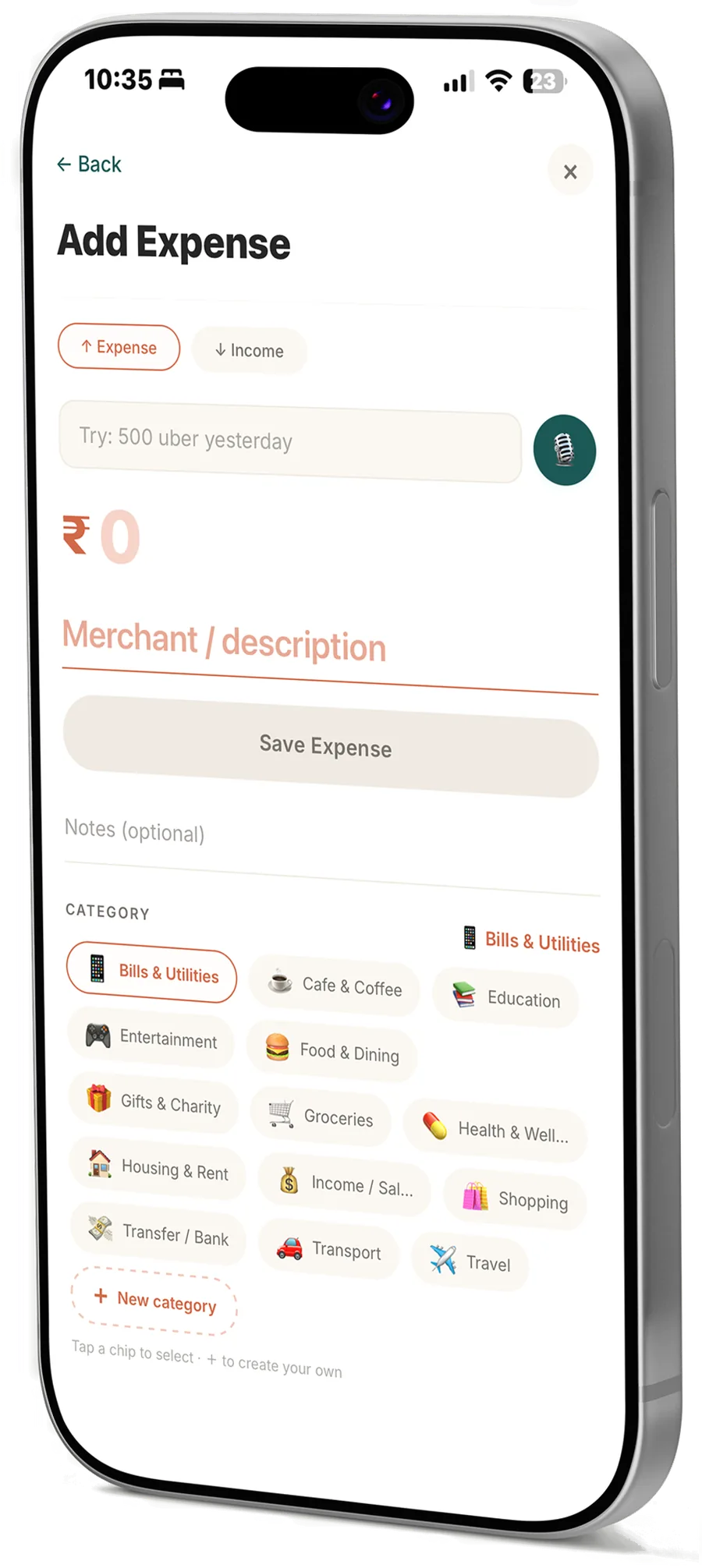
The Add Expense screen: an amount field, a merchant field, a microphone button for voice entry, and a grid of category chips.

Add expense

Cash takes about five seconds.

Amount, merchant, category, save. Or hold the microphone and say it instead, and those fields fill themselves in — with a review sheet in front of you before anything is written.

  • Amount, merchant, category, save. That is the whole screen.
  • Or dictate it, and those fields fill themselves.
  • Income goes in on the same screen, one toggle across.
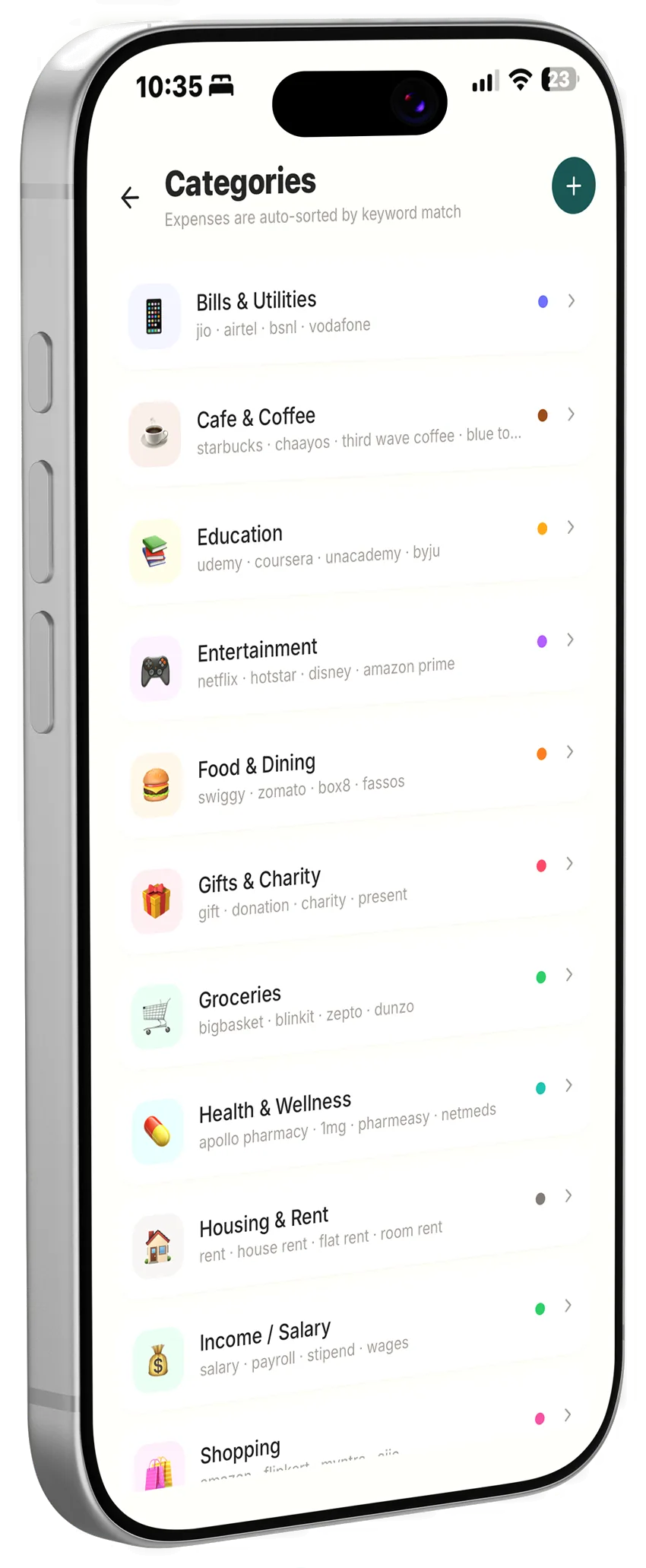
The Categories screen, listing spending categories such as Groceries and Transport, each with its own colour.

Categories

Categories you can bend to fit.

A set to start with, each with its own colour, and everything you log files itself into one of them. Rename any of them, add your own, and what you log afterwards follows the same shape.

  • A starting set, each one carrying its own colour.
  • Add your own, or edit any of the defaults.
  • Every entry stays editable after it saves, category included.

No bank connection

We can’t see your accounts, because we never connect to them.

Not a limited connection, and not a view-only one either. No connection at all — no bank login, no access to your mail, nothing of yours for us to read. There are no credentials here for anyone to lose.

Typing it yourself is the trade, and it buys more than privacy. Bank sync misses cash, tips, the round you got in, the friend who paid you back, and every transfer between your own accounts. You catch those, because you were there.

Voice and chat entry send what you say or type to a model provider so it can be turned into a transaction. Your transactions are not sent. How that works, in full.

Why we’re paid, not free

A free finance app still has to make money. Just not from you.

When an app is free and has no subscription, the money comes from somewhere else: an ad network, a referral fee on a card you were nudged toward, a commission on a fund, or your data sold on to someone who wanted it. Every one of those pays the app to want something other than what you want.

There is one revenue line here, and it is the subscription. No ads on any plan. No referrals, no commissions, nothing sold on the side. Never sold, never shared: no third-party data brokers, no ad networks, no anonymised-and-resold loophole.

The free plan has no ads either. That is not a launch promotion.

Pricing

Free forever. Pro when you want the fast path.

Logging, budgets and categories are free and unlimited, and they stay that way. Pro buys unlimited voice and chat entry, Ask, your full history, and a ledger you can share.

Free

$0

Unlimited manual entry, budgets, alerts and recurring transactions, with the last 30 days of history. 30 voice or chat entries a month.

Pro

$24.99 / year

After a 14-day free trial. Or $3.99 a month, without a trial.

Yearly saves 48%

Prices are shown in US dollars and charged in your local currency by the App Store or Google Play. The full comparison.

Questions worth asking

Does it connect to my bank?

No, and it never will. There is no account linking, no bank login and no read-only connection of any kind. That is the point: we cannot see your accounts because we never connect to them, so there are no credentials of yours for us to lose.

How do transactions get in?

Four ways. Type them in by hand, type a sentence and let the app create them, say it out loud, or on iPhone let an Apple Pay purchase land on its own. Manual entry is unlimited and free on every plan.

Can it really log several transactions from one sentence?

Yes. “Spent $200 on dinner and $100 on Amazon” becomes two entries, each categorised and dated. A review sheet opens first, with one editable row per transaction and a running total, and nothing is saved until you confirm it.

What is Ask, and where do the answers come from?

Ask answers questions about your own spending. Your question leaves the device; your transactions do not. The model turns the question into a query, the app runs that query against your ledger, and the number you see is computed from your own entries. Every answer shows the filter it ran and links to the transactions behind it.

Does Ask give financial advice?

No. Ask can tell you what you have spent. It does not give financial advice. It will not tell you what to cut, what to buy, whether you can afford something, or where to invest, and it is built so that it cannot.

Can two people share a ledger?

Yes. Two people, one shared space, and both of you can add and edit. Each entry shows who added it. One Pro subscription covers both of you, so the person you invite does not need to pay.

Can I get my data out?

CSV export is a Pro feature. It exports everything rather than a summary — every transaction with its category, date and note. Deleting your account deletes your data whether or not you have exported it first.

Is my data sold or used for ads?

Never. No third-party data brokers, no ad networks, no anonymised-and-resold loophole, and no ads on any plan including the free one. The subscription is the only way this app makes money.

More on billing and the trial, or ask us directly.

Join the waitlist

TLDR Money is coming to the United States, Canada, Australia, New Zealand, Singapore and the United Arab Emirates. More countries after that.

Join the waitlist